The short answer
Set the body, then the work surface, then the display.
Begin in a balanced position with shoulders relaxed. Adjust the desk so the keyboard and mouse can be used without lifting the shoulders or bending the wrists sharply. Only then raise, lower or mount the monitor to suit the resulting eye position.
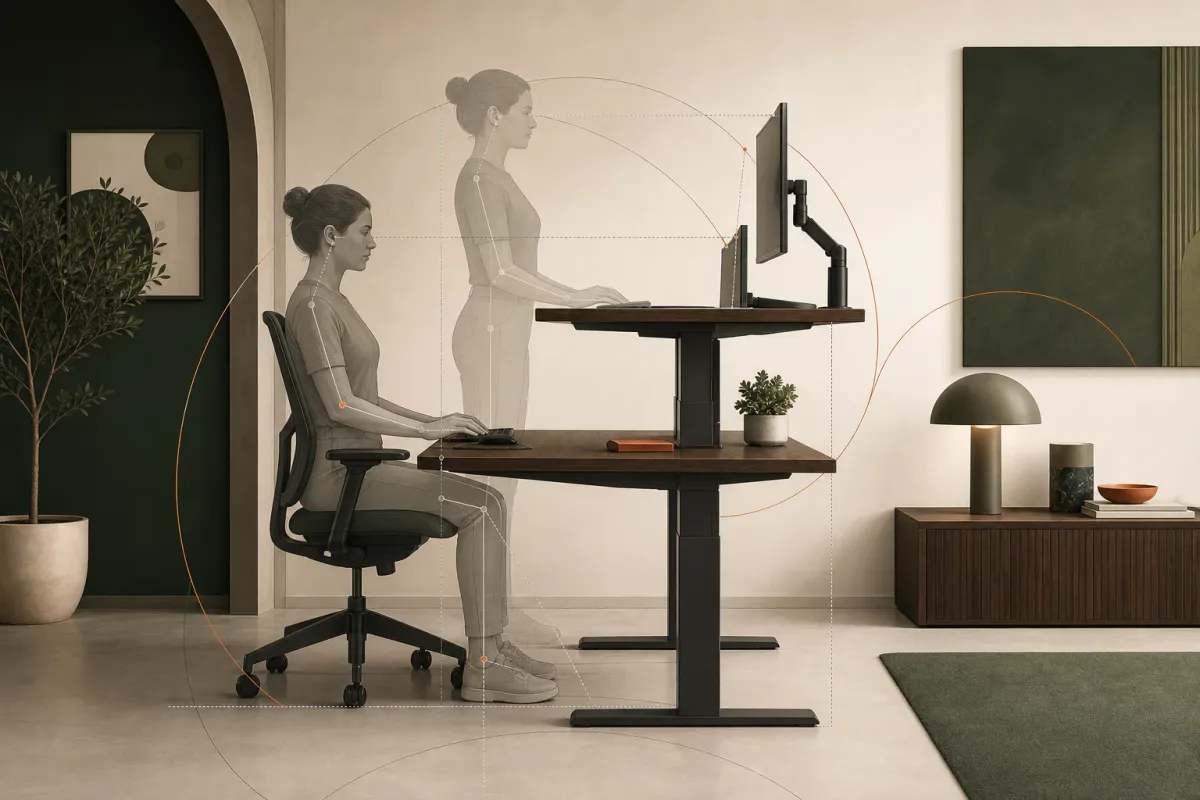
- Feet and postureFind a balanced seated or standing position before moving the equipment.
- Desk and input devicesBring the keyboard and mouse to relaxed hands and shoulders.
- Monitor and viewing anglePosition the display only after the working surface feels settled.
Standing position
Bring the work surface to the hands.
Stand with weight comfortably distributed and elbows close to the body. Bend the elbows to roughly a right angle, then adjust the desk until the keyboard and mouse sit around elbow height or slightly below. The shoulders should remain relaxed and the wrists close to neutral.
- Keep the keyboard and mouse on the same level and close enough to avoid reaching.
- Let the forearms remain approximately parallel to the floor during ordinary typing.
- Lower the surface if the shoulders rise to meet it.
- Move frequently used objects into a comfortable reach zone.
Seated position
Adjust the chair first, then lower the desk to match.
Set the chair so the feet are supported and the legs are comfortable. With the shoulders relaxed and elbows near the body, lower the work surface to meet the hands. If the correct chair position leaves the feet unsupported, a suitable footrest may be more useful than lowering the chair away from the desk.
Save the seated height as a memory position only after the chair, keyboard and mouse work together. A numerical desk height is less important than being able to return to a comfortable relationship between those parts.
| Position | Adjust first | Look for |
|---|---|---|
| Seated | Chair and foot support | Relaxed shoulders, supported feet and hands meeting the keyboard naturally |
| Standing | Body position and desk height | Elbows close to the body, neutral wrists and no upward reach |
| Both | Monitor after the surface | A forward viewing position without repeated neck correction |
Display position
Keep the primary screen in front of the user.
Place the monitor directly in front of the normal working position so the head and torso can remain forward. The screen should sit at a comfortable viewing distance, with the main viewing area around or somewhat below eye level for many users.
- Single displayCentre it on the body and keyboard rather than on the desk itself.
- Two equal displaysCentre the meeting point between them and angle both displays toward the user.
- Primary and secondaryKeep the primary display in front and the secondary close enough to limit repeated large turns.
- Laptop useFor longer sessions, separate the screen from the keyboard with a stand and external input devices.
Continue reading